
User Navigation Flow & Desk Architecture
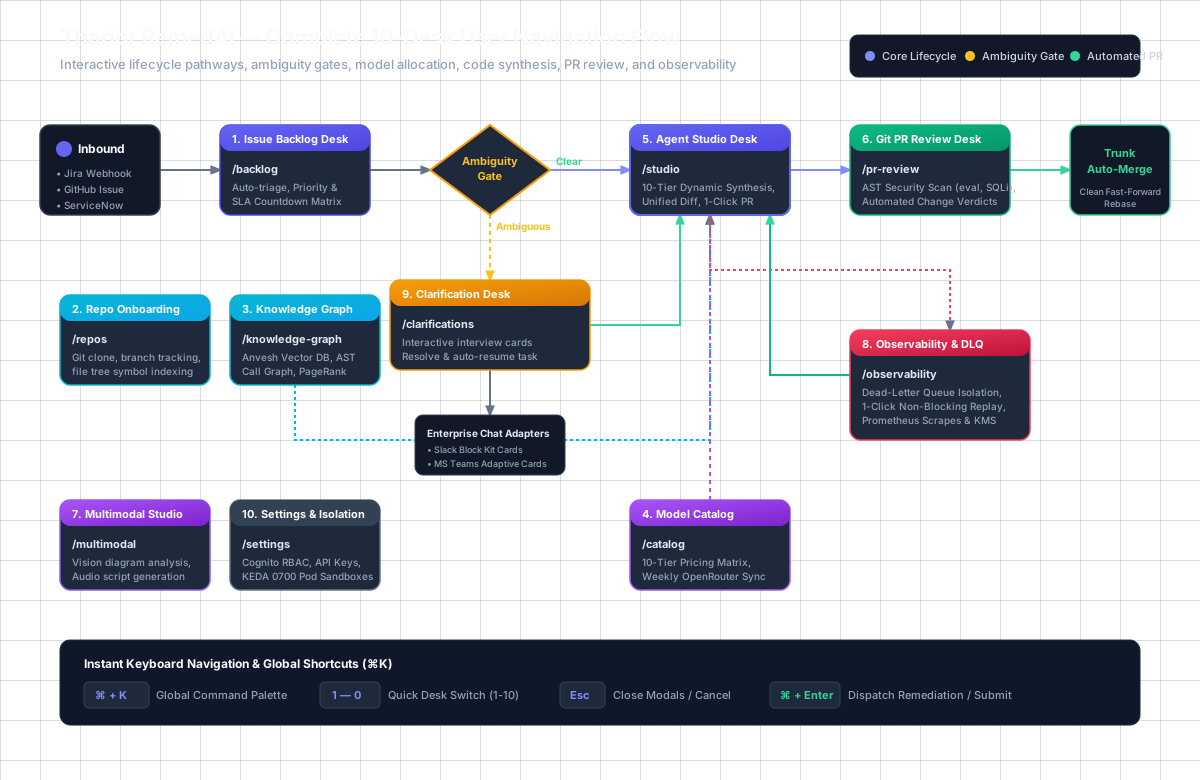
Tharior Remedai is organized as an enterprise 10-Desk Agentic Workspace. Whether triggered by incoming webhooks (Jira, GitHub, ServiceNow) or driven interactively by developers, tasks navigate seamlessly between ambiguity resolution, symbol-grounded code synthesis, security review, and automated trunk merging.
1. End-to-End Navigation Flowchart
The interactive diagram below visualizes the primary lifecycle pathways between all 10 platform desks, the automated Ambiguity Gate, Enterprise Chat Adapters, and the Dead-Letter Queue (DLQ).
2. Core Lifecycle State Machine
Every remediation task transitions through well-defined execution states governed by the TaskStatus machine:
| From State | Trigger / Guard Condition | To State | Active Desk |
|---|---|---|---|
INGESTED |
Inbound webhook received (Jira/GitHub/ServiceNow) or manual ticket creation | QUEUED |
1. Issue Backlog Desk |
ANALYZING |
Ambiguity check fails (unspecified retry, missing backoff, vague specs) | WAITING_CLARIFICATION |
9. Clarification Desk |
WAITING_CLARIFICATION |
User resolves interview card in Desk or via Slack/Teams card | READY_FOR_SYNTHESIS |
9. Clarification Desk |
READY_FOR_SYNTHESIS |
10-Tier LLM router selects optimal model; AST symbols loaded from Anvesh | IN_PROGRESS |
5. Agent Studio Desk |
IN_PROGRESS |
Multi-file code diff synthesized and validated against language AST parser | SYNTAX_VALIDATED |
5. Agent Studio Desk |
SYNTAX_VALIDATED |
PR created on isolated branch remedai/patch-* |
PR_GENERATED |
6. Git PR Review Desk |
PR_GENERATED |
AST Security Scanner checks for eval(), SQL injections, secrets |
APPROVED / CHANGES_REQUESTED |
6. Git PR Review Desk |
APPROVED |
Clean rebase on trunk branch without fast-forward conflicts | MERGED_TO_TRUNK |
6. Git PR Review Desk |
ANY_STATE |
Unhandled upstream exception, timeout, or circuit breaker trip | QUARANTINED_DLQ |
8. Observability & DLQ Desk |
QUARANTINED_DLQ |
1-click non-blocking task replay triggered by operator | REPLAY_DISPATCHED |
8. Observability & DLQ Desk |
3. 10-Desk Navigation Matrix
The Web Desk client (@tharior/web-desk) provides clean HTML5 path-based navigation without hash fragments,
persisting states across reloads:
/backlog
Issue Backlog Desk
Unified ticket ingestion from Jira, GitHub, and ServiceNow. SLA countdowns, priority classification, and 1-click autonomous remediation.
Shortcut: Press5 or ⌘K > Backlog
/repos
Repo Onboarding Desk
Git repository connection, multi-branch tracking, file tree indexing, and Anvesh vector database code synchronization.
Shortcut: Press1 or ⌘K > Repositories
/knowledge-graph
Knowledge Graph Desk
Interactive 2D/3D AST symbol explorer. Call-chain traversal, PageRank centrality scores, and cross-file vector semantic search.
Shortcut: Press2 or ⌘K > Graph
/catalog
Model Catalog Desk
10-Tier Dynamic LLM Engine with weekly pricing refresh from OpenRouter, free tier filters, and customer tier override controls (±2 tiers).
Shortcut: Press4 or ⌘K > Catalog
/studio
Agent Studio Desk
Prompt-driven code remediation, AST targeted scope, side-by-side unified diffs, syntax validation, and 1-click Pull Request creation.
Shortcut: Press3 or ⌘K > Studio
/pr-review
Git PR Review Desk
Autonomous PR Review Agent. Detects security vulnerabilities (eval(), SQL injections, secrets), grades diffs, and executes clean trunk rebases.
6 or ⌘K > PR Review
/multimodal
Multimodal Studio Desk
Architecture diagram OCR, UI screenshot debugging, audio narration scripting for PR walkthroughs, and multimodal routing via Bifrost.
Shortcut: Press7 or ⌘K > Multimodal
/observability
Observability & DLQ Desk
Prometheus metric scrapes, real-time memory headroom, Dead-Letter Queue (DLQ) quarantine list, 1-click non-blocking replay, and KMS key rotation.
Shortcut: Press8 or ⌘K > Observability
/clarifications
Clarification Desk
Ambiguity Gate interactive interview cards. Non-blocking Slack Block Kit and MS Teams Adaptive Card dispatch, resolving blockers in seconds.
Shortcut: Press9 or ⌘K > Clarification
/settings
Settings & Isolation Desk
Cognito RBAC role management, OpenRouter API keys, KEDA ephemeral worker ScaledJob autoscaling, and POSIX 0700 sandbox isolation rules.
Shortcut: Press0 or ⌘K > Settings
4. Role-Based User Journeys
The platform adapts to different operational personas:
Remediation & Feature Workflow:
- Open Issue Backlog (
/backlog) to inspect incoming tickets or start directly in Agent Studio (/studio). - Enter the problem statement or feature requirement in the Prompt Card.
- Review the autonomously assigned LLM Tier (e.g. Tier 6 Core Workhorse for multi-file refactors).
- Inspect the side-by-side unified diff with syntax validation.
- Click Create Pull Request to push an atomic Git branch (
remedai/patch-*) to the remote repository.
Automated Pull Request Review & Merge:
- Navigate to Git PR Review Desk (
/pr-review). - Input the target PR number or webhook-triggered diff.
- The agent runs AST static security checks, flagging dangerous dynamic execution (e.g.,
eval(), SQL injections, secrets). - If the security score is ≥80 and clean, the verdict is set to
APPROVED. - Click Auto-Merge & Rebase Trunk to fast-forward merge the patch into
mainwithout workspace branch pollution.
Observability, DLQ & Resiliency:
- Monitor system health at
/healthzand scrape Prometheus metrics at/metrics/prometheus. - Open Observability & DLQ Desk (
/observability) to check live RSS memory headroom and circuit breaker trip states. - If an upstream LLM provider fails, the task is quarantined in the Dead-Letter Queue (DLQ).
- Click Replay Task on any quarantined DLQ record to re-dispatch execution with a clean slate without blocking active tasks.
5. Global Keyboard Shortcuts
Power users can navigate between desks and execute platform actions without touching the mouse:
| Keystroke | Action / Function | Scope |
|---|---|---|
| ⌘ + K or Ctrl + K | Open Global Search & Command Palette modal | Global across all desks |
| 1 through 9, 0 | Instantly switch active desk (1: Repos, 3: Studio, 8: Observability, etc.) | Global when input not focused |
| ⌘ + Enter | Submit prompt / trigger autonomous remediation synthesis | Agent Studio & Backlog |
| Esc | Close command modal, clear active diff search, or dismiss drawer | Global modal overlay |
| Shift + Tab | Navigate backwards through desk panels and form elements | Standard browser accessible |
Read the Complete User Guide with Screenshots →