
Complete User Guide: 10 Desks of Tharior Remedai
This guide walks you step-by-step through every desk in the Tharior Remedai workspace. Learn how to onboard repositories, inspect AST Knowledge Graphs, trigger autonomous code remediation, resolve ambiguity interviews, review pull requests with automated security analysis, and operate the Dead-Letter Queue (DLQ).
Working Video Demonstrations: 5 Core Operator Workflows
Select any of the 5 modules below to play the working demo simulation, observe step-by-step actions, and inspect live AST flows.
0. DeepWiki & Knowledge Graph Hub (/wiki & /knowledge-graph)
The DeepWiki Knowledge Hub creates living architectural specifications, call flow graphs, and symbol inventories directly from Anvesh AST parsing.
- Living Architecture Specifications: Synthesized markdown documents explaining module purposes, invariants, and dependencies.
- Visual Architecture & Call Flow Blueprint: Interactive flowchart canvas visualizing execution transitions across client, API gateway, routers, and sandbox runners.
- AST Symbol Inventory: Live table of functions, classes, and endpoints with cyclomatic complexity ratings (
CC=1toCC=10) and 1-click jump to the Knowledge Graph.
1. Agent Studio Desk (/studio)
The Agent Studio is your primary workspace for interactive prompt-driven remediation, multi-file code editing, AST scope targeting, syntax validation, and 1-click Pull Request creation.
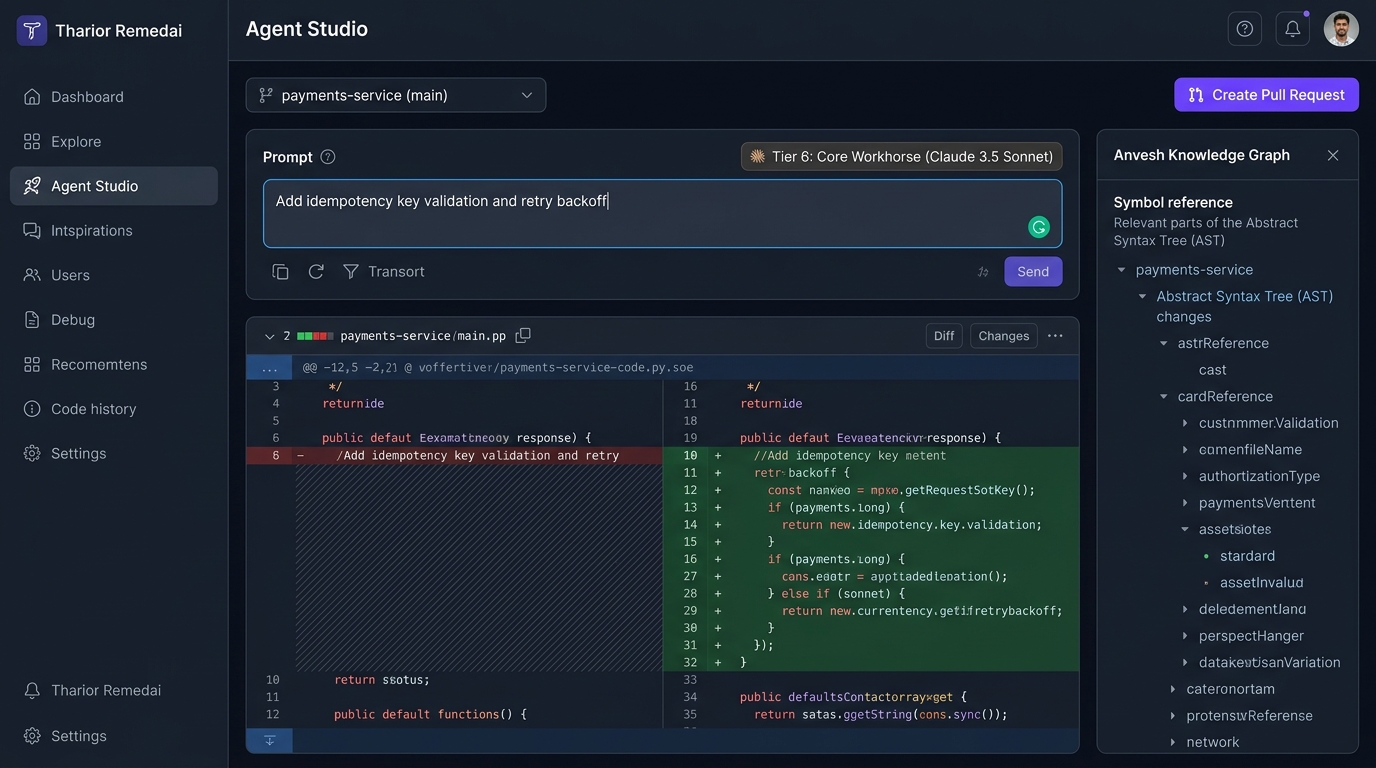
How to Use Agent Studio:
-
Select Target Repository & Branch: Use the top dropdown to select your active repository (e.g.
payments-service (main)). -
Enter Remediation Prompt: Describe the bug fix, refactor, or feature in natural language.
Add idempotency key validation and exponential retry backoff to payments webhook handler -
Scope Selection:
- Single File Scope: Provide a specific path (e.g.
apps/api-gateway/app/main.py) for pinpointed, micro-targeted edits. - Whole Repository Mode: Toggle whole repo mode to allow the agent to traverse the AST dependency graph and coordinate cross-file changes across multiple modules.
- Single File Scope: Provide a specific path (e.g.
- Autonomous Tier Allocation: The engine automatically maps the task to the lowest-cost capable model from your live OpenRouter catalog (e.g. Tier 1 for typos, Tier 6 for multi-file refactors, Tier 10 for multi-model consensus).
-
Inspect Unified Diff & Syntax Status: Review the green additions and red deletions. Notice the
Syntax: VALIDguarantee before any disk write. -
Click "Create Pull Request": Creates an isolated feature branch (
remedai/patch-[hash]), commits the patch, opens a pull request, and returns you cleanly to your working branch.
2. Clarification Desk (/clarifications)
When an inbound ticket contains ambiguous or underspecified requirements, the Ambiguity Gate halts execution to prevent hallucinated code changes. The task generates an interactive interview session.
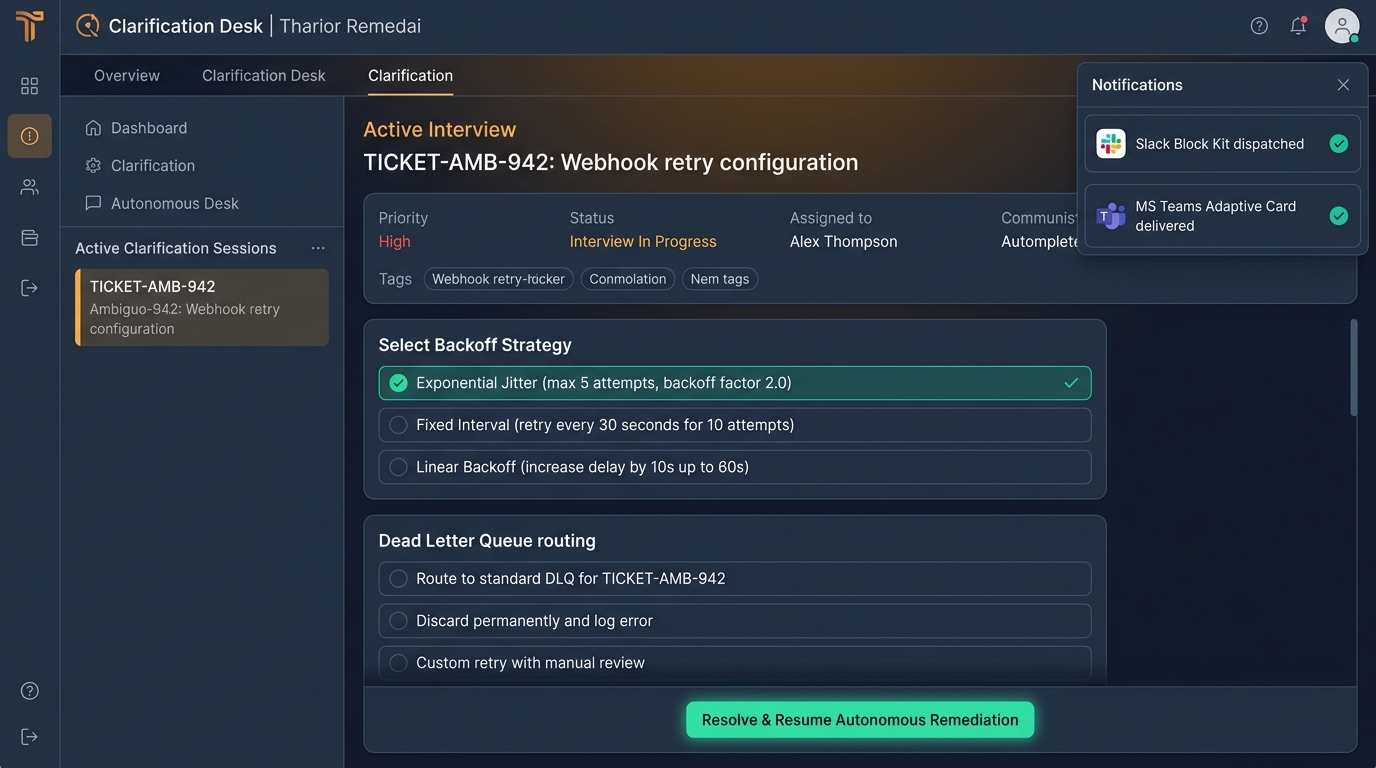
How to Resolve Ambiguities:
- Inspect Blocked Sessions: The left panel lists all tickets currently waiting for human clarification with priority tags.
- Review Question Cards: The agent generates specific, contextual questions (e.g., "Select Backoff Strategy" or "Choose Dead-Letter Queue destination").
- Select Options or Provide Custom Input: Click the preferred option (e.g., Exponential Jitter (max 5 attempts, backoff factor 2.0)).
- External Chat Notification: The system automatically delivers interactive cards to your configured Slack channel (Block Kit) and MS Teams (Adaptive Cards).
-
Click "Resolve & Resume": Submits the answers, transitions the ticket to
READY_FOR_SYNTHESIS, and automatically wakes up the background agent worker.
3. Knowledge Graph & AST Explorer (/knowledge-graph)
Powered by the Anvesh Vector DB & Knowledge Graph, this desk allows developers and architects to explore the code structure as an intelligent semantic network rather than flat text files.
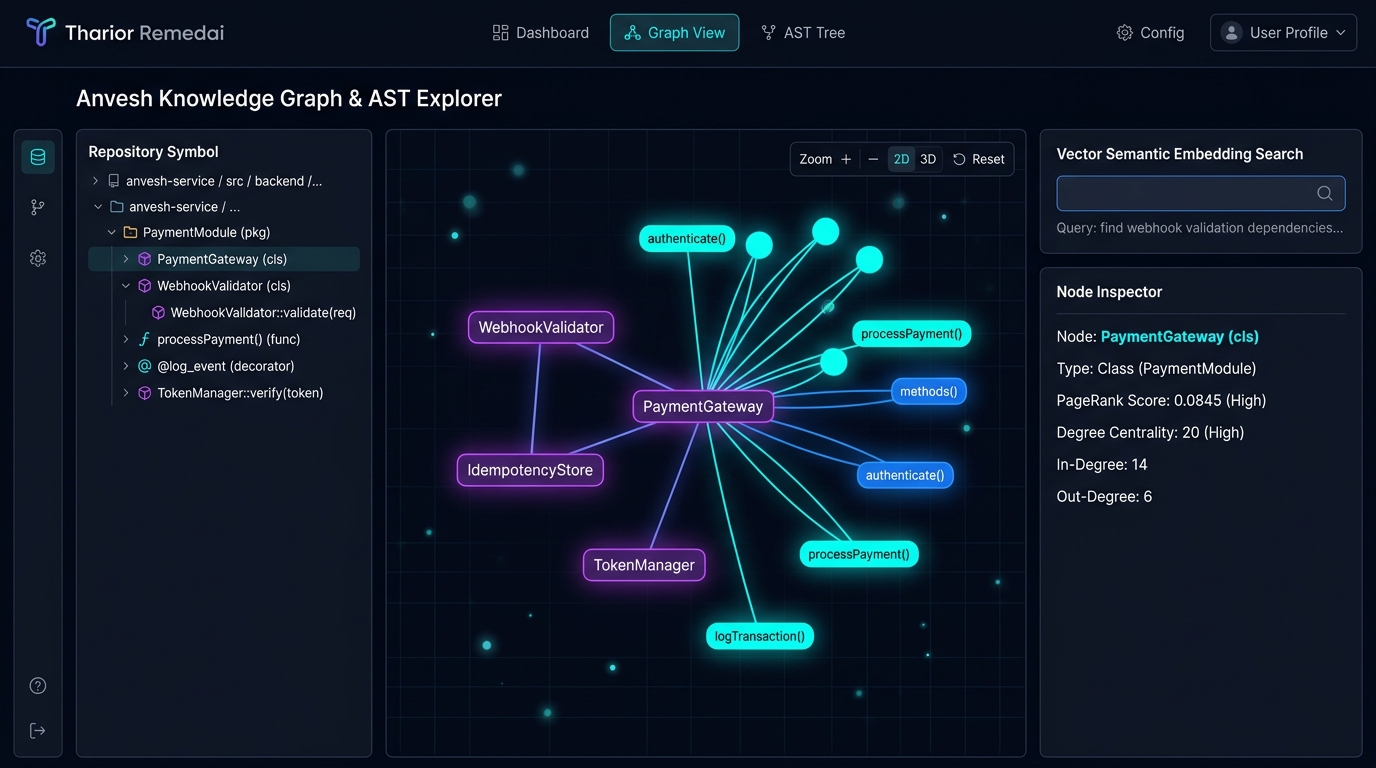
Key Features:
- AST Symbol Tree: Expand packages, classes, decorators, and methods to inspect syntactic hierarchies.
- Interactive Node-Link View: Visualize which classes call which functions. Zoom, pan, and switch between 2D and 3D topologies.
- Centrality & PageRank: Identify the most critical functions in your repository (high in-degree centrality) to gauge blast radius before refactoring.
- Vector Semantic Search: Natural language queries (e.g., "find webhook signature validation dependencies") instantly highlight the relevant subgraphs.
4. Git PR Review Desk (/pr-review)
The Pull Request Review Agent evaluates generated or human-submitted code diffs for functional correctness, style adherence, and critical AST security vulnerabilities.
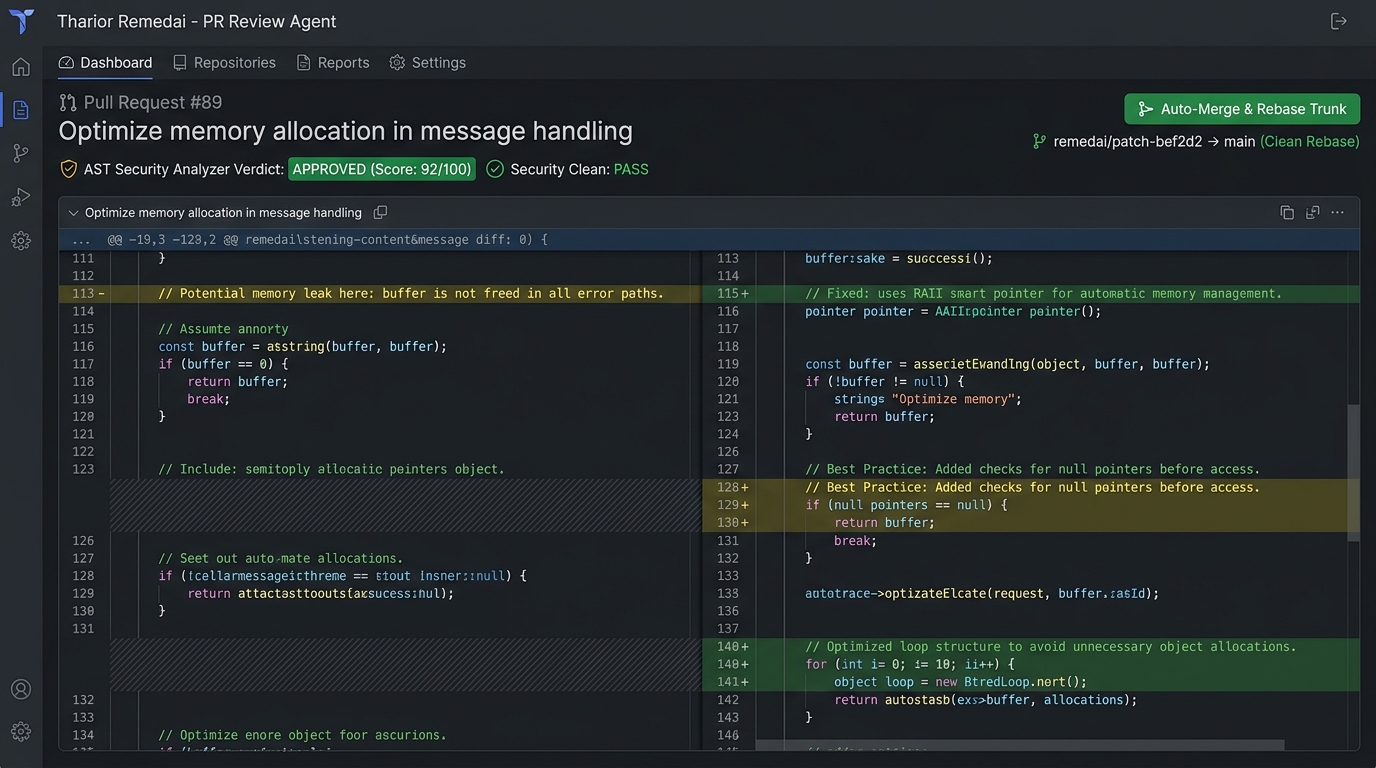
Review Workflow:
- Enter PR Number or Diff: Provide the PR number or paste a unified diff.
-
Automated AST Security Inspection:
- Checks for dangerous dynamic code evaluation (
eval(),exec()). - Detects unescaped SQL injections and hardcoded credentials.
- Identifies uncaught error paths and potential memory leaks.
- Checks for dangerous dynamic code evaluation (
-
Verdict Classification: Diff receives an automated verdict (
APPROVED,REQUEST_CHANGES, orNEEDS_DISCUSSION) along with a 0-100 quality score. -
1-Click Auto-Merge & Rebase: Click Auto-Merge & Rebase Trunk to fast-forward merge the patch into
mainusing the built-in Branch Operator.
5. Observability & DLQ Desk (/observability)
The Observability Desk provides Site Reliability Engineers (SREs) with executive KPIs, real-time memory headroom monitoring, circuit breaker trip indicators, and the Dead-Letter Queue (DLQ).
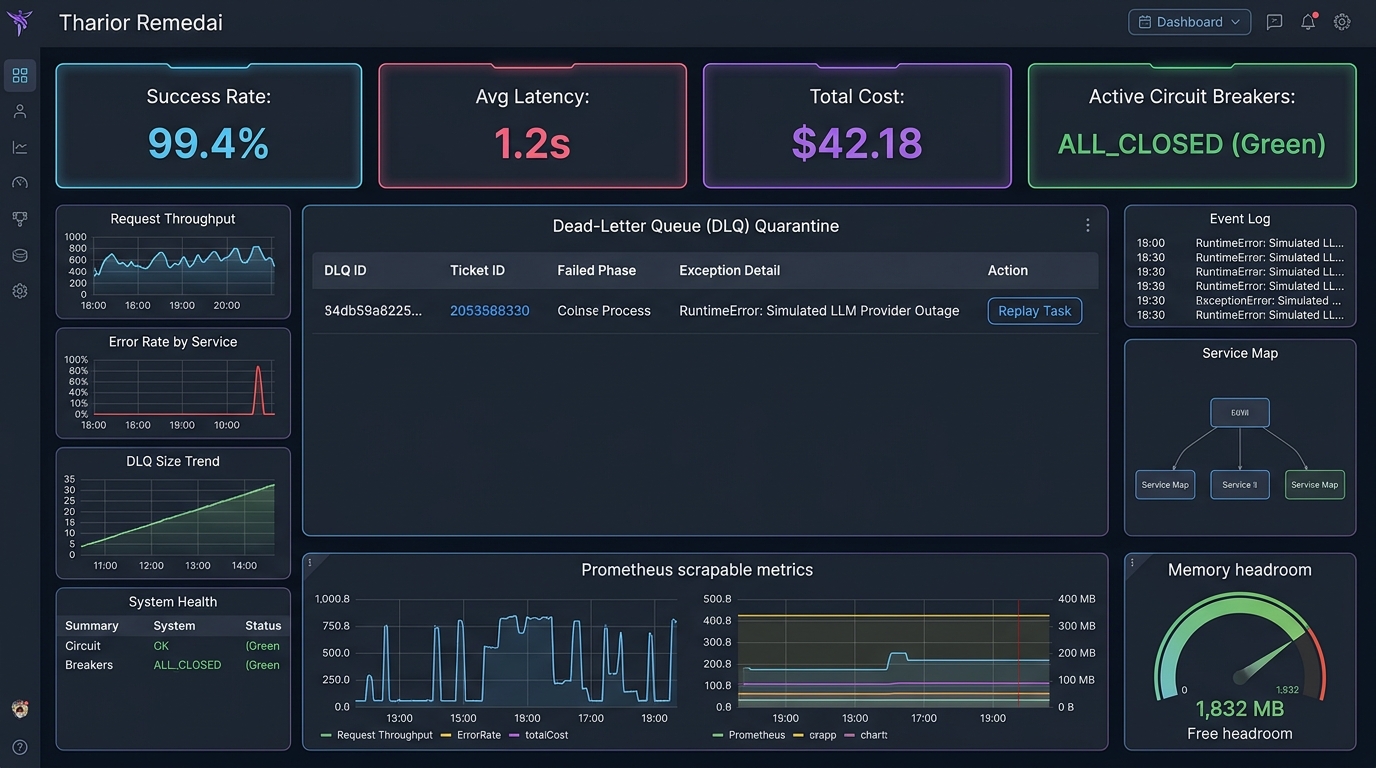
DLQ & Resiliency Operations:
- Dead-Letter Queue Isolation: When an upstream LLM times out or crashes, the task is safely quarantined with its full execution trace, input payload, and error diagnostics.
- Non-Blocking 1-Click Replay: Click Replay Task on any quarantined DLQ record. The task is immediately dispatched into the background queue with clean state without stalling other items.
-
Circuit Breaker Status: Live status of external provider circuit breakers (
ALL_CLOSED,HALF_OPEN,OPEN). -
Prometheus OpenMetrics: Endpoint
/metrics/prometheusexposestharior_tasks_total,tharior_uptime_seconds,tharior_dlq_records_active, and cumulative USD cost for Grafana and Datadog ingestion. - Key Rotation (KMS): Trigger automated cryptographic Key Encryption Key (KEK) rotation with 1 click.
6. Model Catalog & 10-Tier Pricing (/catalog)
Tharior Remedai features zero hardcoded models. The Model Catalog Desk syncs continuously with OpenRouter and allows administrators to inspect and tune the 10-Tier Dynamic Hierarchy:
| Tier | Tier Name | Typical Complexity | Representative Models |
|---|---|---|---|
| Tier 1 | Micro-Lint & Formatting | Score 1 (Typos, README, comments) | Qwen 2.5 Coder 7B, Llama 3.2 3B |
| Tier 2 | Ultra-Fast Patching | Score 2 (Docstrings, rename variable) | Mistral 7B Instruct, DeepSeek Lite |
| Tier 3 | Economy Coder | Score 3 (Unit tests, assertions) | Qwen 2.5 Coder 32B, DeepSeek V2.5 |
| Tier 4 | Mid-Range Generalist | Score 4 (API handlers, routes, validators) | Claude 3.5 Haiku, GPT-4o-mini |
| Tier 5 | Fast Reasoner | Score 5 (Algorithms, state machines) | DeepSeek R1 Distill, Gemini 1.5 Flash |
| Tier 6 | Core Workhorse | Score 6 (Multi-file refactors, ORM) | Claude 3.5 Sonnet, GPT-4o |
| Tier 7 | Deep Reasoner | Score 7 (Deadlocks, race conditions) | o1-mini, DeepSeek R1 Full |
| Tier 8 | Senior Architect | Score 8 (Protocol migrations, breaking APIs) | o1 Preview, Claude 3 Opus |
| Tier 9 | Frontier Synthesis | Score 9 (Formal verification, cryptography) | o1 High Reasoning, Gemini 2.0 Pro |
| Tier 10 | Elite Consensus | Score 10 (Multi-model consensus voting) | Multi-Model Ensemble (Sonnet + o1 + R1) |
7. Issue Backlog Desk (/backlog)
Unified inbox for issues coming from Jira webhooks, GitHub Issues, and ServiceNow. Features automated SLA countdown timers, priority sorting (Critical, High, Medium, Low), and 1-click batch dispatch for autonomous remediation.
8. Multimodal Studio Desk (/multimodal)
Allows engineers to upload UI screenshots, whiteboard architecture sketches, and system diagrams. The vision engine parses database schemas and API flows directly into AST context. Also includes an audio narration synthesizer to generate spoken walkthrough scripts for complex Pull Requests.
9. Repo Onboarding Desk (/repos)
Connect new GitHub/GitLab repositories in seconds. Tracks multi-branch checkouts, extracts symbols into the Anvesh Vector DB, and monitors file tree health metrics (lines of code, AST symbol density, and commit frequency).
10. Settings & Isolation Desk (/settings)
Central administration desk for:
- OpenRouter API Key Management: Configure system-wide or team-specific API keys with live validation.
- KEDA Ephemeral Worker Scaling: Inspect active
ScaledJobsingle-tenant worker pods. - POSIX 0700 Sandbox Isolation: Review filesystem permission boundaries preventing cross-tenant code leakage.
- Cognito RBAC: Configure user roles (
admin,engineer,reviewer).
View the Interactive Navigation Flow Map & State Machine →